Create an API key
To get started you first need to generate an API key. You are able to generate test keys for development and live keys for production.
| Website | Description | |
|---|---|---|
test | portal.dev.mipey.mx | We recommend you always use this environment, production should only be used for the real thing. |
live | portal.mipey.mx | You should only use this if you are ready to go live. |
As a rule of thumb, test resources always use the dev.mipey.mx domain. All following links to the website will use the test environment.
1. Create a profile
Go to the test or live website mentioned above and create a profile. If you already have a profile skip this step.
2. Add a payment account
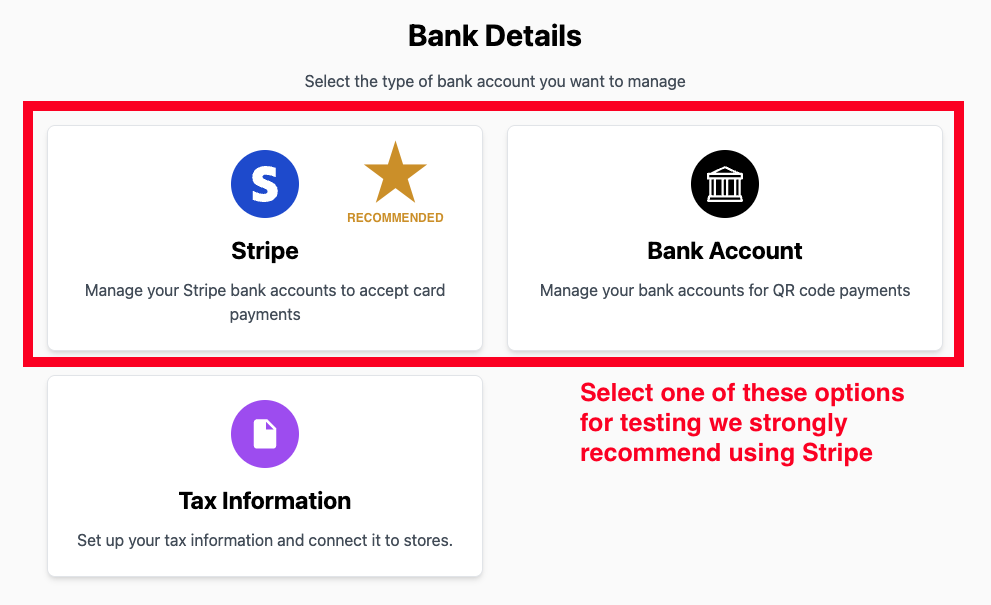
Navigate to the "Finance" section of the website and create a payment account. There are two different types of payment accounts:
| Description | |
|---|---|
stripe | Add your bank information through our Stripe integration to receive cards, Apple Pay, and Google Pay. |
direct | This only works for Mexican bank accounts, you directly add your existing banking information to receive CoDi payments. |
3. Create an API key
After completing the setup of your payment account, navigate to the "Settings" > "Developer" section of the website.
Click on the "Create API Key" button and give it a name. You will be asked to link one of the previously created payment accounts to your API key.
Each API key can be associated with one direct and one stripe payment account at a time. At least one of the two is required to create the API key.