Set up webhooks
Here are some important considerations about our webhooks:
- Webhooks are directly linked to you API key.
- An API key can only have one webhook.
- We use Standard Webhooks to sign requests.
To follow this tutorial you need an API key. If you haven't created one yet, please check the Create an API key tutorial.
1. Configure a webhook
Navigate to the "Settings" > "Developer" section. You will see a list with all your API keys. Click on the gear icon for the API key you want to configure.
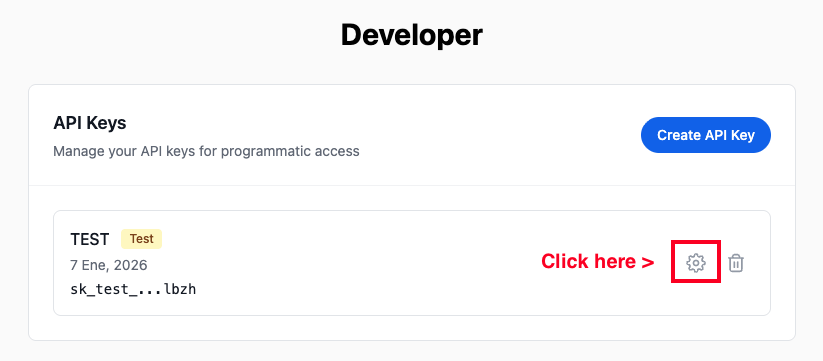
This will open a popup where you will add the URL to receive webhooks. Add the URL and click on the "Create Webhook" button.
2. Save the webhook secret
Once the webhook is created, you will see the webhook secret that will be used to sign requests. Save this secret, you will need it when you create your webhook endpoint.
You are able to rotate the webhook secret at any time in the "Settings" > "Developer" section when you click on the gear icon for the API key.
3. Create your webhook endpoint
Now you are ready to create your webhook endpoint. To validate the webhook signature we recommend using the Standard Webhooks SDKs. More information about webhooks can be found in the Webhooks documentation.